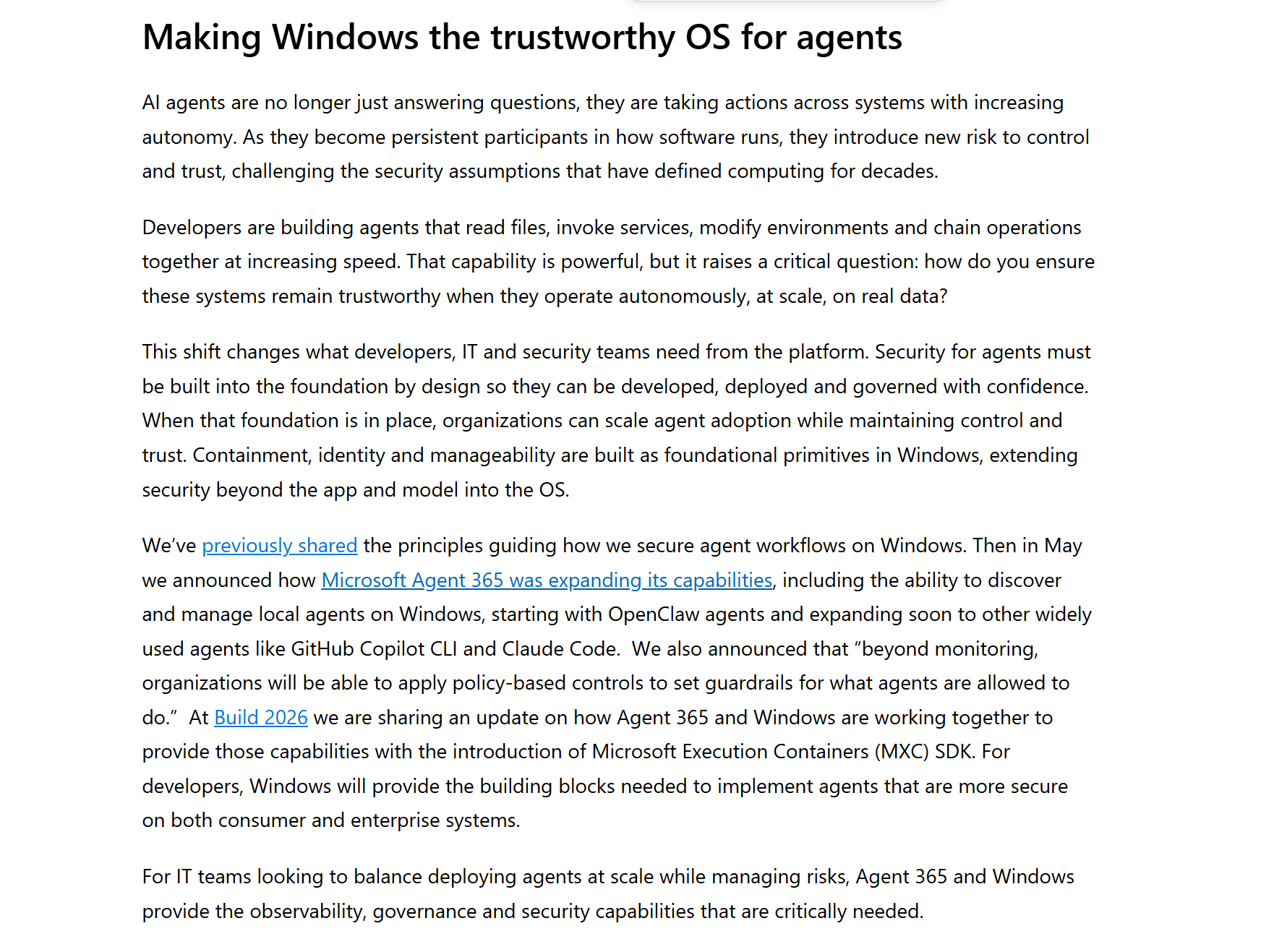
MXC是微软在Build 2026发布的一个策略驱动的沙箱执行层,架在Windows现有隔离原语之上的统一抽象,用一份JSON policy声明约束,MXC负责翻译成对应的OS级强制。
是专门为现在普及度很高的AI agent 设计的,coding agent来执行模型生成的代码,desktop agent操作本地文件和应用,核心假设是这些agent会在运行时动态生成不可信代码,需要在执行前就划定边界。
想看更具体的细节/整体框架可以看微软的原文和仓库,就不过多赘述了(
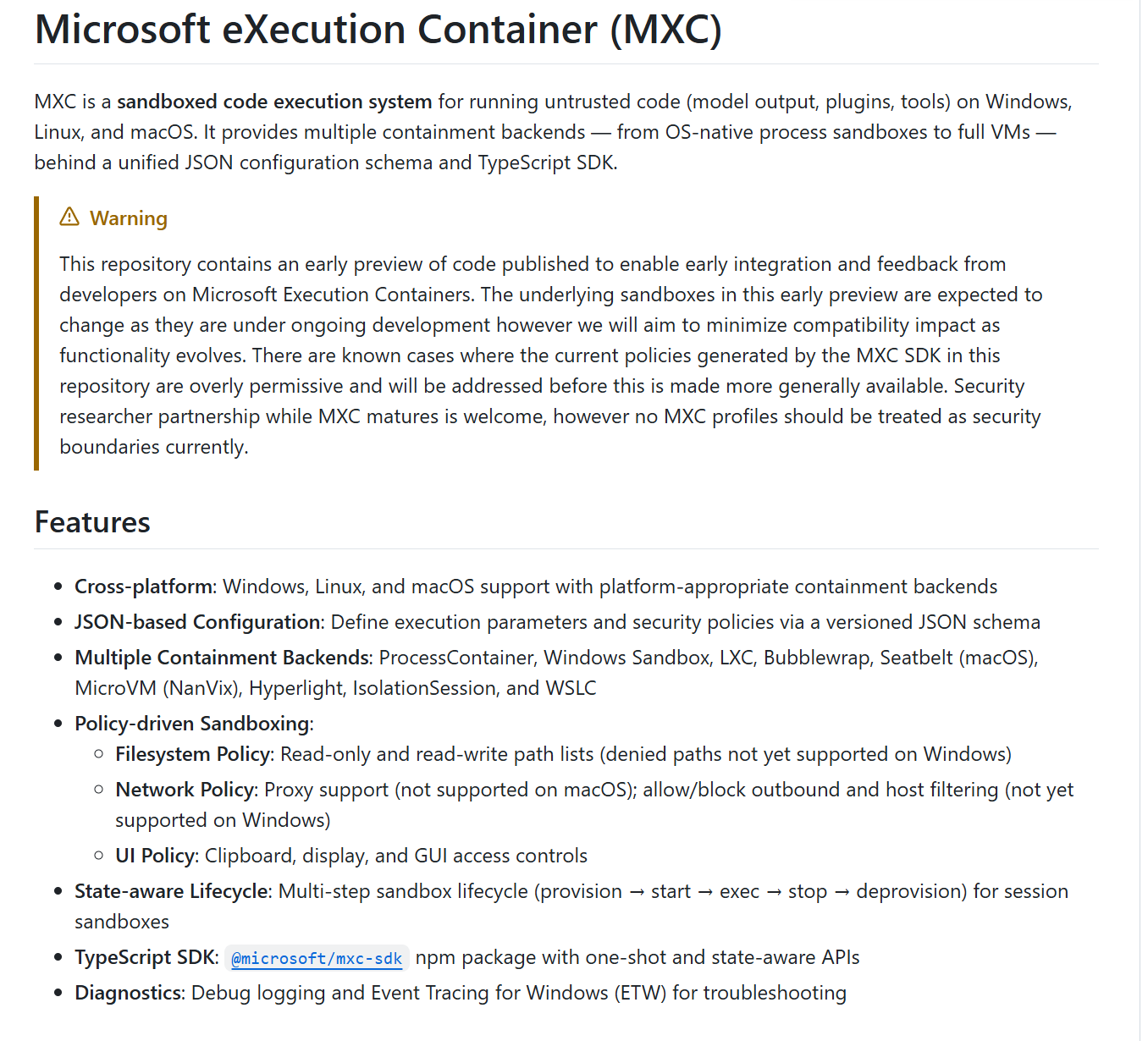
功能特性
跨平台:支持 Windows、Linux 和 macOS,并针对各平台使用适配的隔离后端 基于 JSON 的配置:通过带版本的 JSON schema 定义执行参数和安全策略 多种隔离后端:ProcessContainer、Windows Sandbox、LXC、Bubblewrap、Seatbelt(macOS)、MicroVM(NanVix)、Hyperlight、IsolationSession 和 WSLC 策略驱动的沙箱:
文件系统策略:只读和读写路径列表(Windows 上暂不支持拒绝路径) 网络策略:代理支持(macOS 不支持);出站允许/阻止及主机过滤(Windows 暂不支持) UI 策略:剪贴板、显示和 GUI 访问控制
状态感知生命周期:面向会话沙箱的多步骤生命周期(创建 → 启动 → 执行 → 停止 → 销毁) TypeScript SDK:@microsoft/mxc-sdk npm 包,提供一次性执行和状态感知两种 API 诊断:调试日志记录和 Windows 事件跟踪(ETW)支持
总之就是MXC的安全性是统一policy到后端真实OS强制执行这一步上,但是在preview阶段翻译不均匀的,有些我们能写出来的策略会被静默不执行……
能写的
schema的默认看起来保守,但是本身不挡任何东西,只能作为一份意图声明

filesystem:
- readwritePaths: 读写路径列表,默认 []
- readonlyPaths: 只读路径列表,默认 []
- deniedPaths: 显式拒绝路径列表,默认 []
network:
- defaultPolicy: “allow” 或 “block”,默认 “block”
- enforcementMode: “capabilities” / “firewall” / “both”,默认 “capabilities”
- allowedHosts: default block 时的允许 host/IP/CIDR 列表
- blockedHosts: default allow 时的阻止 host/IP 列表
- allowLocalNetwork: 是否允许 bind/listen 本地网络,默认 false
proxy: 三选一:
- { “localhost”:
} - { “builtinTestServer”: true }
- { “url”: “http://…” }
ui:
- disable: 是否禁用 UI/可见窗口,默认 true
- clipboard: “none” / “read” / “write” / “all”,默认 “none”
- injection: 是否允许键鼠输入注入,默认 false
- timeout:
process.timeout: 毫秒,默认 0 0 表示无限等待,不超时
SDK 层对应关系:
- SandboxPolicy.network.allowOutbound 不在 schema 里,SDK 会映射成 network.defaultPolicy: true -> “allow”,否则 “block”。
- SandboxPolicy.ui.allowWindows 不在 schema 里,SDK 会映射成 ui.disable: allowWindows=true -> disable=false。
- SandboxPolicy.timeoutMs 映射成 process.timeout。
schema的默认姿态是网络默认block UI默认disable 剪贴板默认none,但是schema只是一份意图声明,filesystem那三个旋钮:路径列表默认空,但是空列表意味着什么完全取决于后端怎么解释,schema层根本无法回答。
SDK和schema之间还存在一个翻译层allowOutbound allowWindows timeoutMs都SDK映射进去的,所以后续在评估强制性时的时候要先看SDK怎么翻译,再看native怎么执行。
processcontainer策略
processcontainer在Win上实际能信赖的安全面只有FS读写白名单、defaultPolicy控制的出站开关、UI/剪贴板/显示限制,Copilot CLI在用的正是这个窄内核,剩下的都带条件。
最危险的一列是部分强制,为什么不是不支持呢,因为不支持但会报错的行为是诚实的,allowedHosts/blockedHosts运行时直接 Err,我们写了错误的规则就会被当场告诉,危险的是 proxy,因为它被接受被配置和被推荐为网络约束手段,但是代码自己在 appcontainer_runner.rs:988写着只有WinHTTP栈被代理,raw socket和其他HTTP栈可以绕过。
↑允许出站但走审计代理,被沙箱的代码开个raw socket就出去了
processcontainer的有效安全面是policy×tier×OS build×调用路径的函数,对一支宿主环境不齐的agent队,我们无法只审一份policy文件来评估安全性,必须知道每台宿主的tier是什么,代码走的是JSON还是SDK。
源码
把↑里所有文档说的换成代码做的看哪里不一致,对着已知的几条缝隙假设去找反证或确,同时找一下找文档没写的缝。
第一种是文档撒谎 代码诚实,例如allowedHosts/blockedHosts,schema写着 processcontainer强制执行它,SDKREADME说Windows不实现,而代码(base_container_runner.rs:418)是直接Err,运行时行为是fail-closed,schema的存在让运维相信这个功能可用(而它根本不可用
全局错误
#[cfg(target_os = "windows")]
pub const DENIED_PATHS_NOT_SUPPORTED_MSG: &str =
    "filesystem.deniedPaths is not yet supported on Windows. Paths are denied by \
     default unless granted via readwritePaths or readonlyPaths. Remove deniedPaths, \
     or narrow readwritePaths/readonlyPaths to exclude the path you wanted to deny.";

#[cfg(target_os = "windows")]
pub const HOST_LISTS_NOT_SUPPORTED_MSG: &str =
    "network.allowedHosts / network.blockedHosts are not yet supported on Windows. \
     Remove the host list(s) and rely on network.defaultPolicy (allow / block) or a \
     proxy instead.";
BaseContainer runner 直接拒绝 deniedPaths 和 host lists:
impl ScriptRunner for BaseContainerRunner {
    fn validate_runner(&self, request: &ExecutionRequest) -> Result<(), ScriptResponse> {
        if !request.policy.denied_paths.is_empty() {
            return Err(ScriptResponse::error(
                wxc_common::error::DENIED_PATHS_NOT_SUPPORTED_MSG,
            ));
        }
        if !request.policy.allowed_hosts.is_empty() || !request.policy.blocked_hosts.is_empty() {
            return Err(ScriptResponse::error(
                wxc_common::error::HOST_LISTS_NOT_SUPPORTED_MSG,
AppContainer runner 对非 DACL mode 的 deniedPaths、以及 host lists 也拒绝:
impl ScriptRunner for AppContainerScriptRunner {
    fn validate_runner(&self, request: &ExecutionRequest) -> Result<(), ScriptResponse> {
        if !request.policy.denied_paths.is_empty() && self.filesystem_mode != FilesystemMode::Dacl {
            return Err(ScriptResponse::error(
                wxc_common::error::DENIED_PATHS_NOT_SUPPORTED_MSG,
            ));
        }
        if !request.policy.allowed_hosts.is_empty() || !request.policy.blocked_hosts.is_empty() {
            return Err(ScriptResponse::error(
                wxc_common::error::HOST_LISTS_NOT_SUPPORTED_MSG,
第二种代码诚实地降级,但是调用方不知道,找出来了env fallback,downlevel OS上 Experimental_CreateProcessInSandbox不支持environment参数,retry without env block(base_container_runner.rs:713),child拿到的是宿主默认环境。虽然不报错 不中断执行也不违反任何策略字段,但是破坏了沙箱只看到我明确给的环境变量这个假设,环境里有密钥就进了被沙箱的代码。
// 4. Call Experimental_CreateProcessInSandbox.
//    If the OS returns ERROR_NOT_SUPPORTED (0x32) and we passed a non-null
//    environment block, this is a downlevel build that doesn't support the
//    `environment` parameter. Retry once without it.
...
if retries_remaining > 0
    && is_environment_not_supported(err.0, !current_env_ptr.is_null())
{
    ...
    let diag = diagnose_environment_not_supported();
    ...
    // Retry without the environment block.
    current_env_ptr = ptr::null();
    current_creation_flags = 0;
    continue;
}
第三种是强制是有条件的,条件不透明,deniedPaths的error.rs里有全局错误文案说Windows不支持,BaseContainer runner直接拒绝,但是AppContainer+DACL tier有真实实现路径。
impl ScriptRunner for BaseContainerRunner {
    fn validate_runner(&self, request: &ExecutionRequest) -> Result<(), ScriptResponse> {
        if !request.policy.denied_paths.is_empty() {
            return Err(ScriptResponse::error(
                wxc_common::error::DENIED_PATHS_NOT_SUPPORTED_MSG,
结果是同一份policy在BaseContainer路径上报错,在AppContainer+DACL路径上真deny,调用方没有办法从policy文件本身推断出当前是哪个tier,此刻是否生效。
第四种是沙箱的副作用留在宿主上,清理best-effort,这一种在上面内容没有位置,是看源码才有的,DACL fallback默认开启(fallback.allowDaclMutation: true),直接改宿主文件系统的安全描述符,Drop路径吞错误(filesystem_dacl.rs:53),恢复靠下次启动重试。
"fallback": {
  "type": "object",
  "description": "Operator consent for host-impacting containment fallbacks. Each flag gates a specific fallback mechanism the runner may otherwise pick when the preferred primitive is unavailable. Defaults preserve the pre-fallback-section behavior (all permitted).",
  "properties": {
    "allowDaclMutation": {
      "type": "boolean",
      "default": true,
      "description": "When the BaseContainer API is absent and bfscfg.exe is unavailable, allow MXC to apply DACL ACEs on policy paths (Tier 3 fallback). MODIFIES HOST FILESYSTEM SECURITY DESCRIPTORS — original DACLs are restored on exit. Set to false to refuse this fallback (the run will fail on machines that need Tier 3)."
BFS cleanup失败也不fail,这类风险的方向和前面是反的,它是沙箱进程异常退出后宿主的ACL留在了一个比原来更弱的状态,在agent里可能一次失败的run会悄悄降低下一次run的宿主基线。
这些缝不是同质的,抛开容易修的文档和行为一致性问题,像DACL restore和BFS cleanup 的best-effort问题,根源还是用户态进程崩溃后没有人负责清理,我觉得搞个主进程启动时向 watchdog注册,watchdog持有一个Windows Job Object,主进程消失时watchdog自动触发清理(毕竟用户态就能实现
在MXC这种模型里,危险点在于隔离状态不完全存在于沙箱进程内部,还会落到宿主上,DACL fallback会修改宿主文件系统安全描述符,BFS会注册AppContainer文件系统broker policy,network proxy / loopback exemption / AppContainer profile也都有宿主侧状态。所以应该考虑的是如何让清理失败或让下一次run继承错误状态
像可控失败点/跨run标识复用/并发竞态都是可用的,在MXC里可以第一次run触发Tier 3 DACL fallback,让MXC给某个host path添加AppContainer SID的RW/RO ACE,随后通过 crash/kill/恢复失败让ACE没清掉,第二次run使用相同AppContainer SID,即使policy没再声明该路径也能因为宿主DACL残留获得访问。
这类漏洞是因为沙箱执行器把宿主当成临时状态存储,但清理不是事务性的,因为agent天然会连续执行多个任务,且每个任务都可能被视为新的沙箱,所以只要污染一次宿主基线就可能等到后续更有价值的任务来利用(
不在这层修的是host allow/block lists,在Windows上做不到进程级精确过滤,毕竟Linux有network namespaceWindows……能绕过DNS的raw socket不经过任何用户态过滤点,除非上内核驱动,但是这就不算轻量进程沙箱了。
如果要强制所有流量走一个本地代理只放行白名单里的host,但是proxy本身就是best-effort 的,raw socket不走代理这个问题没有解决;proxy的WinHTTP-only限制同理,我们控制不了应用选择什么HTTP 栈和开没开raw socket。
preview阶段的问题更像是是文档没有把边界画清楚(
看下来简而言之就是不要把proxy当网络隔离,deniedPaths用之前先确认当前tier,手写json和走SDK在allowLocalNetwork上安全性不一样,需要选一条路锁死
后续可能的漏洞方向
安全语义随调用路径漂移
if request.policy.network_proxy.is_enabled() {
    logger.log_line(
        "warning: proxy support on Windows is best-effort -- only scripts that use \
         the WinHTTP stack will be proxied; other HTTP stacks may bypass it. The \
         AppContainer backend may also surface a UAC prompt.",


let _ = writeln!(
    logger,
    "warning: proxy support on Windows is best-effort -- only scripts that use \
     the WinHTTP stack will be proxied; other HTTP stacks may bypass it.",
);
这类风险是因为安全语义不是绑定在policy名字上,是随调用路径-后端-tier-OS build漂移,非常容易产生调用方以为声明了限制,实际native runner没强制和降级强制。
看proxy 配置,同一个containment: processcontainer,OS build 不同,runtime自动选择走 AppContainer legacy路径还是BaseContainer路径,对调用方是不透明的。
两条路径的proxy语义完全不同,AppContainer 路径依赖需要 admin/elevation 的 winhttp-proxy-shim.exe(proxy_coordinator.rs:407),UAC 失败时 sandbox 直接拒绝启动(appcontainer_runner.rs:996),fail-closed,行为正确;BaseContainer 路径不需要提权,proxy URL 进 FlatBuffer SandboxSpec(base_container_runner.rs:199)。
AppContainer legacy path 的 warning:
if request.policy.network_proxy.is_enabled() {
    logger.log_line(
        "warning: proxy support on Windows is best-effort -- only scripts that use \
         the WinHTTP stack will be proxied; other HTTP stacks may bypass it. The \
         AppContainer backend may also surface a UAC prompt.",
BaseContainer path 的 warning:
// Log the effective proxy config after resolution.
if request.policy.network_proxy.is_enabled() {
    ...
    let _ = writeln!(
        logger,
        "warning: proxy support on Windows is best-effort -- only scripts that use \
         the WinHTTP stack will be proxied; other HTTP stacks may bypass it.",
    );
文档说”app-created WinHTTP sessions may or may not pick it up”,强制力更弱且完全不走 AppContainer 路径里的防火墙规则代码。
AppContainer (v0.4.0): The SDK uses
winhttp-proxy-shim.exe(requires admin/elevation) to set per-AppContainer WinHTTP proxy policy via the DNS cache service. Tools that use WinHTTP withWINHTTP_ACCESS_TYPE_AUTOMATIC_PROXY(like curl.exe) respect this policy. Tools that use their own DNS resolution (.NET HttpClient, PowerShell) do not.
BaseContainer (v0.5.0): The proxy URL is passed in the FlatBuffer spec to
CreateProcessInSandbox. The OS-levelappinfosvcconfigures WinHTTP proxy for the container. System-level WinHTTP sessions (Windows telemetry) use the proxy. App-created WinHTTP sessions may or may not pick it up depending on how they’re initialized. fail-closed本意是好的但是执行坏了,它的部署摩擦制造了:UAC失败→运维去掉proxy配置解决部署报错→网络约束静默消失
不需要攻击者介入,代码层日志层安全审计层都看不到这个漂移。
typescriptconst config = createConfigFromPolicy(policy, ‘process’); config.process!.commandLine = ‘python script.py’; const child = spawnSandboxFromConfig(config);
必须在 createConfigFromPolicy 之后修改 config 才能用它,修改 ContainerConfig 看起来和正常用法完全一样,代码 review 里不会显眼,lint 也不会报,类型系统不会拦。
比如SDK语义绕过,SDK的SandboxPolicy是便利层,任何同进程调用方只要能改ContainerConfig就能绕过SDK默认值,比如加 capabilities、改 defaultPolicy、改 UI,漏洞形态会像产品声称所有工具调用默认禁网/禁 UI,但是某条内部路径用了spawnSandboxFromConfig来绕过 createConfigFromPolicy的默认保护。
↑是开发者写错了的场景,还有一个不需要开发者写错的场景是prompt injection导致的 in-process代码执行,如果agent的编排层在解析tool调用结果时存在任何形式的动态执行路径,被沙箱的代码可以尝试让编排层执行一段修改ContainerConfig的代码。
Prompt injection属于上层agent编排层风险,但是我们看MXC的代码是可以发现只要同进程代码能在spawnSandboxFromConfig(config)前改ContainerConfig,最终native runner接收的就是被改后的JSON。
export function spawnSandboxFromConfig(
  config: ContainerConfig,
...
): pty.IPty | ChildProcess {
以及
return resolveBinaryAndCommonArgs(JSON.stringify(config), options);
所以第一次 run 的输出影响第二次run的ContainerConfig不是本身逻辑,是任何使用 MXC SDK的agent orchestrator如果把非可信输出进入同进程动态执行/配置生成路径,就会落在这个信任边界上。
在下一次sandbox spawn之前把capability列表塞进去,或者把defaultPolicy改成allow,这是在当前沙箱的输出里埋下修改下一个沙箱配置的指令。
这两条路径结合起来漏洞形态就是第一次run的沙箱输出影响了第二次run的ContainerConfi,且这个影响在任何一次run的日志里都看不出来,因为每次spawn单独看都是正常的调用。
Windows proxy被当作网络边界
network.proxy在Windows processcontainer里是让一部分客户端走代理的机制,如果上层产品把它解释成所有网络都只能经代理,因此可做域名allowlist/审计/阻断,就会产生安全语义错配。
if request.policy.network_proxy.is_enabled() {
    logger.log_line(
        "warning: proxy support on Windows is best-effort -- only scripts that use \
         the WinHTTP stack will be proxied; other HTTP stacks may bypass it. The \
         AppContainer backend may also surface a UAC prompt.",
这会变成漏洞的原因是proxy的安全语义被调用方理解为把sandbox网络收口到代理,代理负责allowlist/blocklist/logging,所以不可信代码不能随意联网。
但是processcontainer实现里的真实语义更弱,如果客户端使用WinHTTP自动代理路径,它可能会走配置的代理,否则可能绕过。
所以选择一个类似自带DNS栈,语言runtime的socket层和某些库的自定义resolver,都可能不经过WinHTTP自动代理。
DNS Resolution
Method AppContainer BaseContainer PowerShell Invoke-WebRequest❌ DNS fails (uses .NET, not WinHTTP) ❌ Same WinHTTP COM ( WinHttp.WinHttpRequest.5.1)⚠️ See below ⚠️ See below curl.exe ✅ Works with proxy shim (0.4.0) ❌ Doesn’t use WinHTTP auto-proxy
PowerShell
Invoke-WebRequestDNS Issue
Invoke-WebRequestuses .NET’sHttpClientwhich performs DNS resolution in-process. Inside an AppContainer without DNS access, this fails even wheninternetClientcapability is granted.internetClientenables TCP connections but does not grant DNS resolution for .NET’s resolver.
Workaround: Use WinHTTP-based tools (curl.exe with proxy shim, or WinHTTP COM object)
AppContainer (v0.4.0): The SDK uses
winhttp-proxy-shim.exe(requires admin/elevation) to set per-AppContainer WinHTTP proxy policy via the DNS cache service. Tools that use WinHTTP withWINHTTP_ACCESS_TYPE_AUTOMATIC_PROXY(like curl.exe) respect this policy. Tools that use their own DNS resolution (.NET HttpClient, PowerShell) do not.
BaseContainer (v0.5.0): The proxy URL is passed in the FlatBuffer spec to
CreateProcessInSandbox. The OS-levelappinfosvcconfigures WinHTTP proxy for the container. System-level WinHTTP sessions (Windows telemetry) use the proxy. App-created WinHTTP sessions may or may not pick it up depending on how they’re initialized.
推演一下攻击路径上层产品使用 processcontainer,配置 network.proxy,并以为这等价于所有出站网络经代理。产品再把敏感上下文交给prompt token派生数据这样的不可信代码,不可信代码用不服从WinHTTP proxy的网络路径。
如果同时defaultPolicy是allow,或者为了proxy可用而给了internetClient能力,那么就可以直接出站了……毕竟代理侧没有看到流量,像allowlist DLP 域名限制都是失效的。
// --- Build capability list ---
let mut capabilities_to_add: Vec<String> = request.policy.capabilities.clone();
capabilities_to_add.push("AgenticAppContainer".to_string());

let use_capabilities_for_network = matches!(
    request.policy.network_enforcement_mode,
    NetworkEnforcementMode::Capabilities | NetworkEnforcementMode::Both
);
if use_capabilities_for_network
    && request.policy.default_network_policy == NetworkPolicy::Allow
    && !capabilities_to_add.iter().any(|c| c == "internetClient")
{
    capabilities_to_add.push("internetClient".to_string());
AppContainer
之前提到过MXC的AppContainer路径提供了process字段,按schema声明调用方可以通过这个字段控制沙箱里的代码只看到哪些环境变量,MXC的设计意图是隔离不可信代码来让它看不到宿主的敏感信息。
我测试机的环境,跑getPlatformSupport的时候返回的是isolationTier: base-container,看起来应该走BaseContainer路径 实际上没有。BaseContainer API 需要两个velocity key开启才能工作,这台机器上这两个key没有启用,调用直接返回E_NOTIMPL,runtime自动降级走了AppContainer路径,schema也要从 .6.0-alpha降到0.4.0-alpha才能跑起来。
在AppContainer路径上就出现两个问题:
- 传入process.env时进程直接报ERROR_INVALID_ENVIRONMENT (0x800700CB) 启动失败,process.env字段在这条路径上完全不可用,schema里没有任何说明。
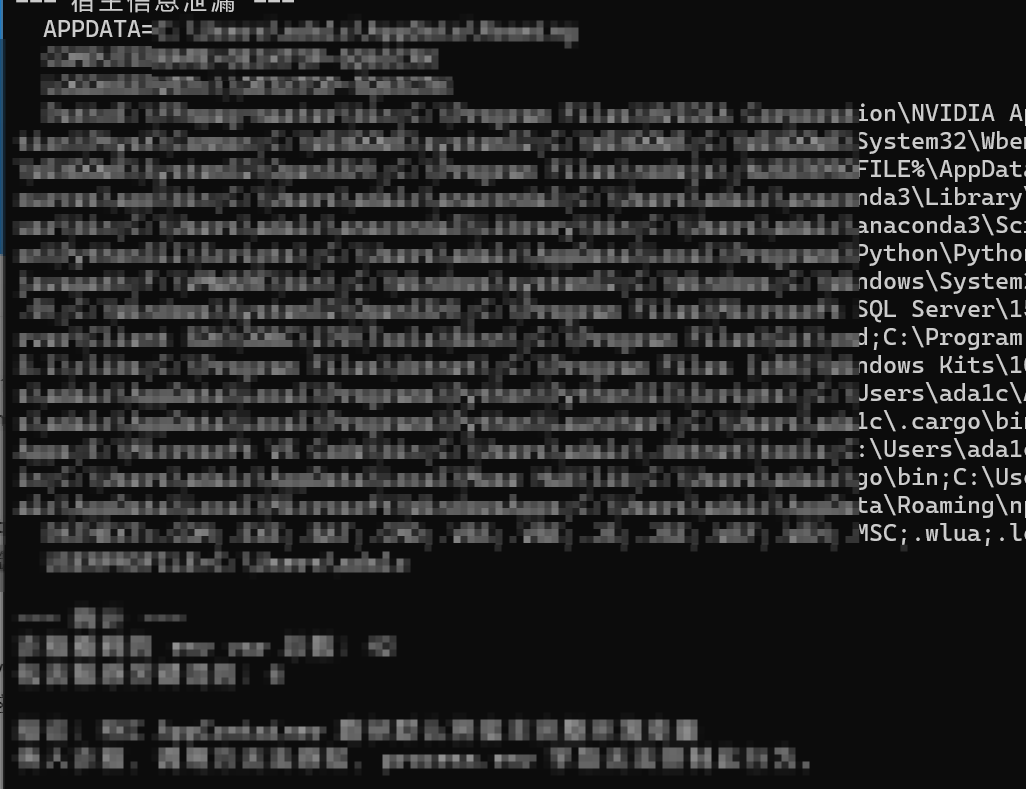
- 不传process.env时,沙箱默认继承用户profile注册表里的完整持久环境变量,包括机器名、域信息、用户路径、工具链目录、以及所有通过setx持久设置的凭据类变量。
验证方法是建立一个只存在于宿主的唯一值,然后看沙箱里能不能读到它
setx MXC_LEAK_PROOF "confirmed_persistent_host_marker"
这个值通过setx写入注册表,沙箱进程本身不可能自己生成它,新开窗口跑沙箱测试,沙箱里执行 cmd /c set,输出里出现了:
MXC_LEAK_PROOF=confirmed_persistent_host_marker
所以宿主注册表里写的值,沙箱里的代码直接读到了。
↑的场景,本机装了Copilot CLI,载体只需要是prompt injection,agent肯定会被要求处理一个网页/md文件/git commit,里面如果嵌了恶意指令就可以让模型生成读取env后外泄。
env已经在里面了,os.environ一行搞定再配合defaultPolicy allow直接出站。当然能不能外传取决于defaultPolicy是什么,block发不出去 allow能发出去,但是实际上现实里block不是默认,毕竟很多agent需要调用外部API和访问服务(
估计很多企业已经开始部署agent来处理工作了,每台机器上有大量凭据,如果MXC成为这些agent的执行层,env又隔离失效,一次成功的prompt injection可以横向影响整个agent处理过的所有数据。
微软的防御强调的防御是Defender对prompt injection的实时检测和session isolation,Defender的prompt injection检测是语义层面的防御,但是prompt injection是一个语义问题 不是语法问题……
在自己电脑上测试的时候还发现一个新路径OneDrive,OneDrive是在MXC沙箱之外运行的,MXC的策略管不到它,沙箱写文件和系统服务同步这个通道不经过MXC的任何检查,只要readwritePaths包含OneDrive目录。
虽然默认是空列表,但是我发现s实际上我根本不知道自己加了。。。getUserProfilePolicy和getAvailableToolsPolicy这类助手的设计目的是让agent能访问用户的工作环境,如果它的实现是把%USERPROFILE%或者用户家目录整个加进readwritePaths,OneDrive 就自动进去了。。。。
因为我自己电脑的OneDrive就在%USERPROFILE%下面,如果像我一样按文档推荐用法写代码,用便利API且没有手动检查就中招了